
1
Open the waiting room
At your scheduled appointment time, select Join Your Virtual Appointment ↗. The link opens Psychology Today Sessions.
Joining a virtual consultation or evaluation should be straightforward. Find the waiting-room link, set up your device, and get ready for your appointment, all in one place.
Join Your Virtual Appointment ↗Click the button above to enter the virtual waiting room when it is time for your scheduled appointment.
Whether this is your first virtual appointment or your tenth, you'll use the same waiting-room address unless our office tells you otherwise.
At your scheduled appointment time, select Join Your Virtual Appointment ↗. The link opens Psychology Today Sessions.
Follow the prompts, enter a name Dr. Bowers can recognize, and allow access to your camera and microphone if requested.
You'll remain in the virtual waiting room until Dr. Bowers admits you. Please don't worry if he is finishing with another family.
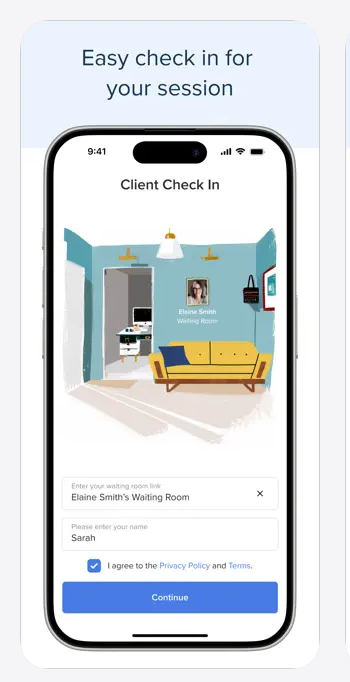
When you open Psychology Today Sessions, follow the prompts to enter the waiting room and type your name. The screenshot is an example from the client app, so the exact screen may look slightly different on your device.
Example screenshot provided for orientation. Use the actual Join button on this page to open your appointment waiting room.
Use a computer, smartphone, or tablet in a quiet, private, stationary location. Please wear headphones when possible to protect confidentiality and reduce background noise.
Already using the Psychology Today client video app? If it asks you to enter a therapy or waiting-room name manually, use dr-mark-bowers.

These appointments are personal conversations, and we want you to feel comfortable talking openly. Some families find it helpful to bring a few notes or bullet points so they remember the topics they want to discuss. You can also share relevant documents or follow up with our office outside the video appointment when needed.
Good communication matters more than a perfect video connection. If technical problems make it difficult for us to hear or understand each other, Dr. Bowers may switch to a phone call so we can stay focused on the conversation and make good use of your appointment time.
For a parent or caregiver consultation, your child should not attend. Please arrange care or choose a time when your child is elsewhere so you can focus on the discussion without feeling divided.
An office, a quiet room at home, or a safely parked car can work well when you have privacy and a stable connection. Avoid busy public settings where others might overhear personal information.
When an evaluation includes your child, Dr. Bowers will explain when the child needs to be present. Young children may say hello, show a favorite toy, talk about their interests, or play naturally nearby while he observes.
Older children and teens may be able to speak with Dr. Bowers one-on-one. If a child is shy, anxious, or reluctant to be on camera, there is no expectation of a polished performance. We will adapt to what helps them feel comfortable.
Please check your camera, microphone, and audio settings before your scheduled appointment, especially if you are using a new device. This checklist is for your convenience only. It does not collect or send information to our office, and you do not have to complete it to join.
When you open the Psychology Today waiting room, your browser may ask to use your microphone and camera. Select Allow so Dr. Bowers can see and hear you.
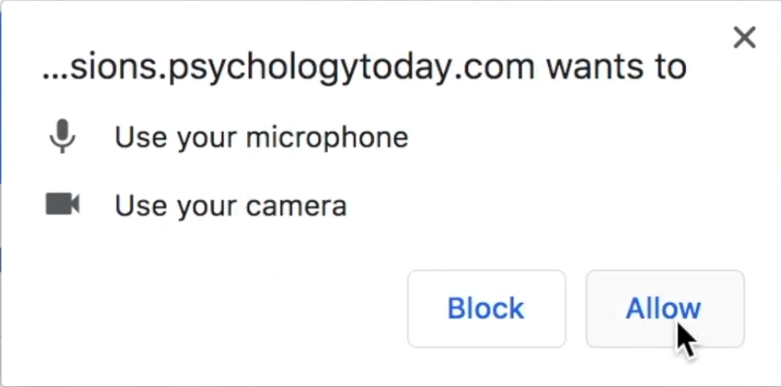
If you selected Block by mistake, open your browser's site permissions (often found by selecting the icon next to the website address), allow the camera and microphone, and reopen the waiting room. The prompts may look slightly different depending on your device and browser.
What should I see? Once your camera is enabled and working, you should see a live preview of yourself in the camera window. This demonstration shows a dark preview at some points, but yours should display your image when your camera is active.
These answers address the questions families most often have about virtual appointments.
No. The Psychology Today waiting-room address used by our office is the same for future appointments unless we specifically tell you otherwise. Bookmark this page for easy access.
No. You'll check in to the virtual waiting room. Dr. Bowers can see that you've arrived and will admit you when ready. Please use a name he will recognize.
On a computer, you can typically use a compatible web browser. On a phone or tablet, the Psychology Today client video app may be helpful or requested by your device. Links to the official apps appear above.
Multiple invited people may be able to join the same appointment from different devices. Please coordinate additional participants with our office in advance so Dr. Bowers knows whom to expect.
Before your appointment, test your microphone and speakers. If there is a problem, confirm the microphone is not muted and that the browser or app has permission to use it. Reconnect headphones if needed or try your device's built-in audio. If the problem continues when Dr. Bowers joins, he will assess the situation and may call you by telephone to complete the appointment. Please do not rely on an immediate response from office staff during your scheduled session.
Before the appointment, check that the app or browser has camera permission and close other programs that may be using your camera. If needed, reopen the waiting-room link. If the camera still does not work, enter the waiting room if you can. Dr. Bowers will evaluate the issue when connecting with you and may continue by phone when appropriate. Our office may not be immediately available for live technical support.
Stay in the waiting room initially. Dr. Bowers may be completing a prior appointment. If the delay continues or you have trouble connecting, contact our office through your usual channel.
No. Parent and caregiver consultations are adult-only appointments. Please plan for your child to be elsewhere so you have privacy and can concentrate on the conversation. An appointment reminder may still display your child's name because the appointment is associated with their record.
That is okay. Dr. Bowers may start with a brief greeting, invite a child to show a favorite item, or observe younger children playing naturally in the room. Older children may speak with him individually. He will guide you based on your child's age and comfort.
Yes, if you are safely parked in a quiet place with reliable Wi-Fi or mobile data, privacy, and limited distractions. Stay parked for the whole appointment. Do not join or continue a video appointment while driving.
Try to remain in a location with a steady signal. If video or audio problems continue, Dr. Bowers may decide to complete the appointment by telephone so your scheduled time is used well. Our office has your contact number on file, and Dr. Bowers will call you if that becomes necessary.
No. If you have a scheduled telephone appointment to review results from a neurodevelopmental, psychoeducational, or neuropsychological assessment, you do not need to enter the video waiting room. Dr. Bowers will call you using the contact number on file. Follow the specific instructions provided by our office for your appointment.
Use the same waiting-room link whenever you have a scheduled virtual video appointment with Dr. Bowers. If your appointment is by telephone, follow the separate instructions from our office.
Join Your Virtual Appointment ↗
Get started today before this once in a lifetime opportunity expires.